OctoIHD Manual
Welcome to the OctoIHD user manual.
OctoIHD is an in-home energy display from TopBytes Ltd for Octopus Energy customers. A 7-inch capacitive touchscreen driven by an ESP32-S3 shows what your home is using right now, read from your Octopus Home Mini, together with day, week and month charts and a running bill costed against your actual tariff — including Intelligent Octopus Go smart-charge slots, standing charges, VAT, export and Octoplus events such as Power Ups and Happy Hours.
OctoIHD talks to Octopus Energy directly over your home WiFi using your own API key. There is no app, no account with TopBytes and no server in between: plug it in, join it to your WiFi, enter your Octopus account number and API key, and the screens fill in.
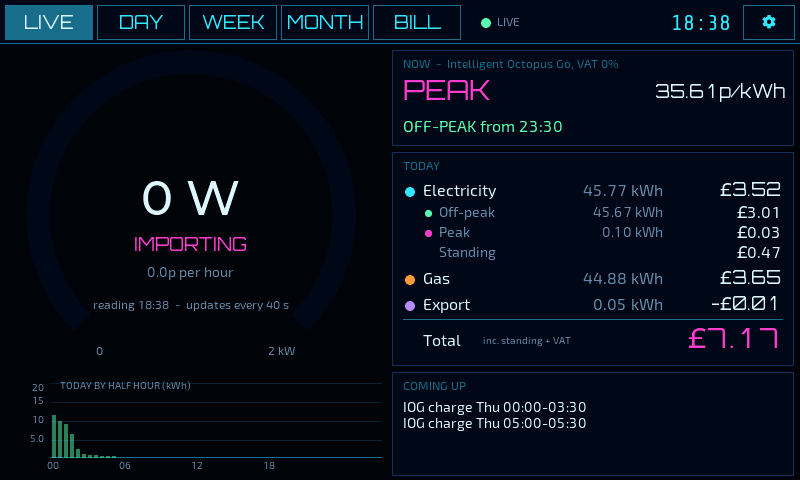
The Live screen (Neon theme).
OctoIHD
Quick Links
About This Manual
This manual covers:
Powering on, joining WiFi and connecting your Octopus account
Reading the Live, Day, Week, Month and Bill screens
How costs are worked out: rate bands, Intelligent Octopus Go slots, standing charges, VAT, export and credits
Settings on the touchscreen and on the settings website (
http://octoihd.local)Night mode, themes, brightness and screen rotation
Troubleshooting, firmware updates (OTA) and technical specifications
Trademarks and Data
Energy data, tariffs and account information are read from your own Octopus Energy account through the Octopus Energy API, using the API key you provide.
Octopus Energy, Intelligent Octopus Go, Octopus Home Mini and Octoplus are trademarks of Octopus Energy. OctoIHD is an independent product from TopBytes Ltd. It is not affiliated with, endorsed by or supported by Octopus Energy. Please contact TopBytes, not Octopus Energy, about OctoIHD.
Support
For additional support, please visit:
Website: https://www.topbytes.net
Support email: support@topbytes.net