Introduction
What is OctoIHD?
OctoIHD is an in-home display (IHD) for households supplied by Octopus Energy. It sits on a desk, shelf or kitchen worktop and answers the questions people actually ask about their energy:
What am I using right now, and what is it costing per hour?
Am I on the cheap rate or the peak rate, and when does that change?
What have today, this week and this month cost — including standing charges and VAT?
What will this month's bill come to?
How much did smart charging my car save?
It reads live demand from your Octopus Home Mini and your half-hourly history, tariff, bills and credits from your Octopus account, then costs every half hour itself against your real tariff.
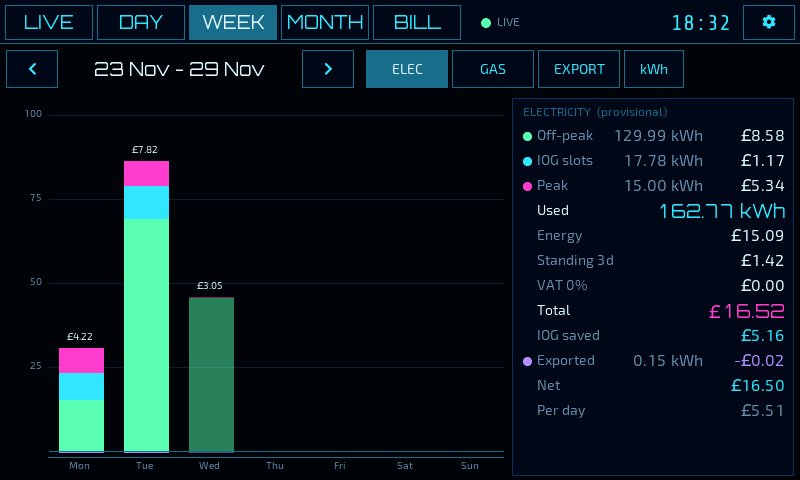
The Week screen: each day split into off-peak, Intelligent Octopus Go slots and peak, with the week's costs on the right.
Key Features
7-inch Colour Touchscreen
A bright 800 × 480 capacitive touchscreen, readable across the room. Five screens — LIVE, DAY, WEEK, MONTH and BILL — are one tap away on the tab bar.
Live Power and the Rate Now
A large gauge shows your home's demand in watts, whether you are importing or exporting, and what that costs per hour at the current rate. Next to it: the tariff band you are in now, its price per kWh, and when the next band starts.
Costs That Match Your Bill
Every half hour is costed against the tariff in force at the time, with daily standing charges and VAT worked out per fuel per day (0% is a normal rate and is shown as such). Days that Octopus has already settled use Octopus's own costs; today is worked out on the device and marked provisional until it settles.
Intelligent Octopus Go Aware
On Intelligent Octopus Go, smart-charge slots outside the normal 23:30–05:30 off-peak window are shown as IOG slots and costed at the off-peak rate, just as Octopus bills them. Upcoming charging slots are listed on the Live screen, and the Bill screen shows how much smart charging saved compared with charging at the peak rate.
Many Octopus Tariffs
As well as Intelligent Octopus Go, OctoIHD understands Octopus Go, Agile, Cosy, Flux, Intelligent Flux, Snug, Tracker, Economy 7 and single-rate tariffs such as Flexible and Fixed. See Supported Tariffs.
Electricity, Gas and Export
Gas is shown alongside electricity, with its own standing charge and VAT. If you have an export meter, exported energy and earnings appear too, and totals are shown net of export.
Octoplus Events and Credits
Power Ups are costed at 0p, Weekend Happy Hour credits are matched back to the hour they paid for, joined Power Downs are marked on the Day chart, and goodwill, Octopoints and referral credits are listed separately on the Bill screen.
Settings Website
Everything can be set on the touchscreen, and a settings website at
http://octoihd.local lets you enter your API key and change settings from a phone or
computer on your home network, protected by a pairing code shown on the screen.
Three Themes and Night Mode
Choose Classic, Neon or Amber. A night-mode schedule can switch the screen off, dim it, or show a dark night screen with the clock, live power and the current rate.
Over-The-Air Updates
New firmware is delivered over WiFi from the TopBytes update service.
Requirements
To Run OctoIHD
An Octopus Energy electricity account (gas and export are optional)
An Octopus Home Mini paired to your smart meter, for live power and today's readings
Your Octopus account number (
A-followed by eight characters) and API key (startssk_live_), both from your account on the Octopus Energy websiteA 2.4 GHz WiFi network with internet access
A 5 V USB-C power supply rated 1 A or more
Note
Without a Home Mini, OctoIHD can still show settled history and costs from your account, but not live power or today's half-hourly use.
How It Works
Smart meter ──> Octopus Home Mini ──> Octopus Energy ──(internet)──> your WiFi ──> OctoIHD
                                      (your account)                               (7" touchscreen)
Your Home Mini reads the smart meter and sends readings to Octopus.
OctoIHD asks Octopus for the latest reading about every 40 seconds, and for your tariff, half-hourly history, planned smart-charge slots, bills and credits on longer schedules.
It costs each half hour against your tariff and stores about 100 days of history on the device, so it survives a power cut without downloading everything again.
Typical Use Cases
Kitchen or Hallway Display
See at a glance whether the oven, kettle or heater is pushing demand up, and what it is costing per hour.
EV and Battery Owners
Watch the off-peak window and smart-charge slots, and check what charging the car really cost.
Keeping an Eye on the Bill
Follow the bill period as it builds and see a month-end estimate, instead of waiting for the statement.
Design Philosophy
Standalone
OctoIHD talks to Octopus directly. Your API key is stored on the device and only ever sent to Octopus.
Accurate Before Pretty
Figures are worked out the way Octopus bills them — dated rates, daily standing charges and VAT per fuel — and are labelled provisional until Octopus settles them.
Kind to Your Octopus App
Octopus limits how often an account's live readings can be fetched, and the limit is shared with the Octopus app. OctoIHD keeps well inside it so the app keeps working.